Game Editor Studio
Easily create game editors, and use the editors of others!
Game editor studio is a program that lets people generate editors for games without knowing any code!
You can create editors, or use the editors other people have made!
(Download link is at bottom of this page)
Now for the long explanation version...
Game editor studio's main features are:
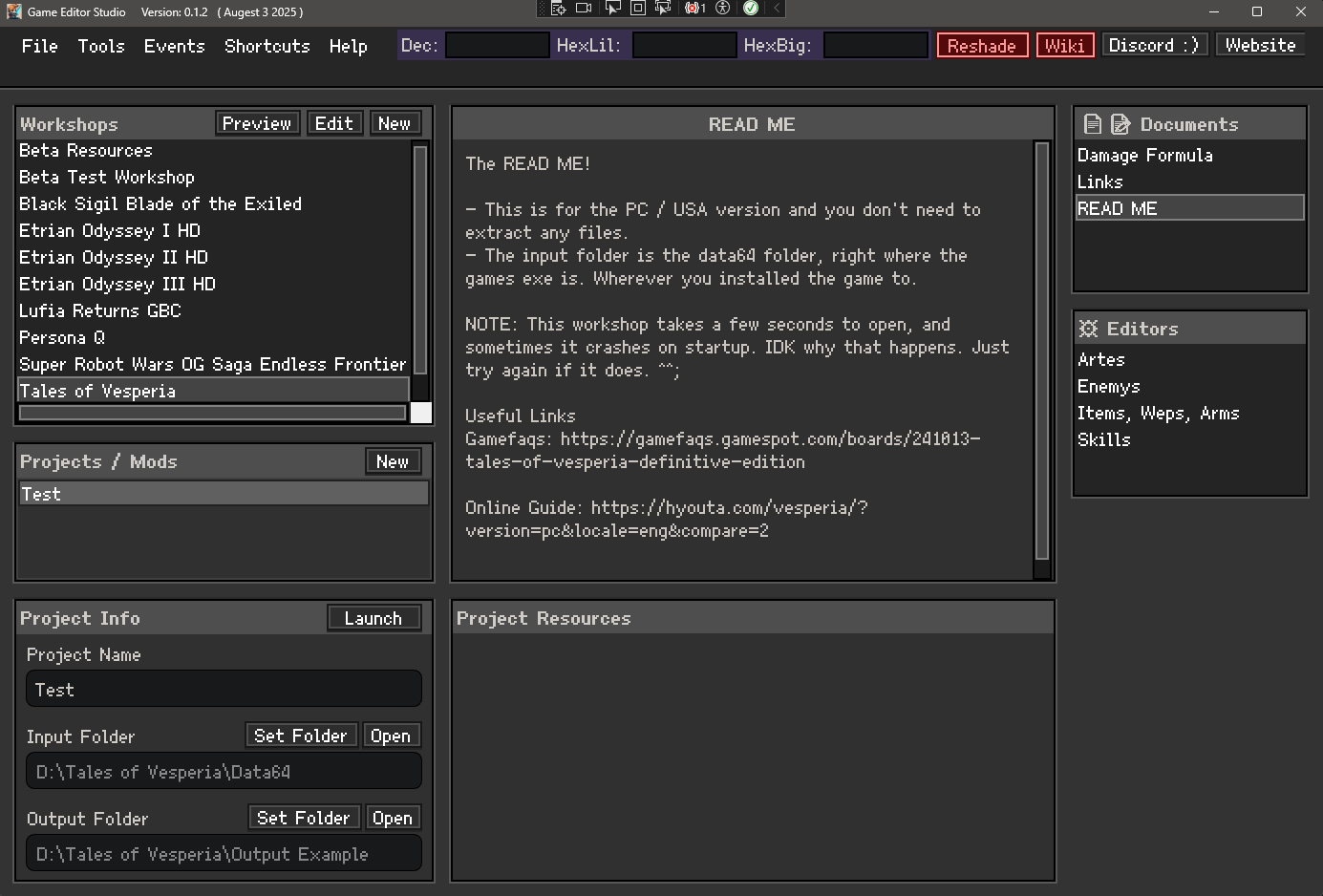
- Create a "workshop" for a game. It holds any number of editors for that game.
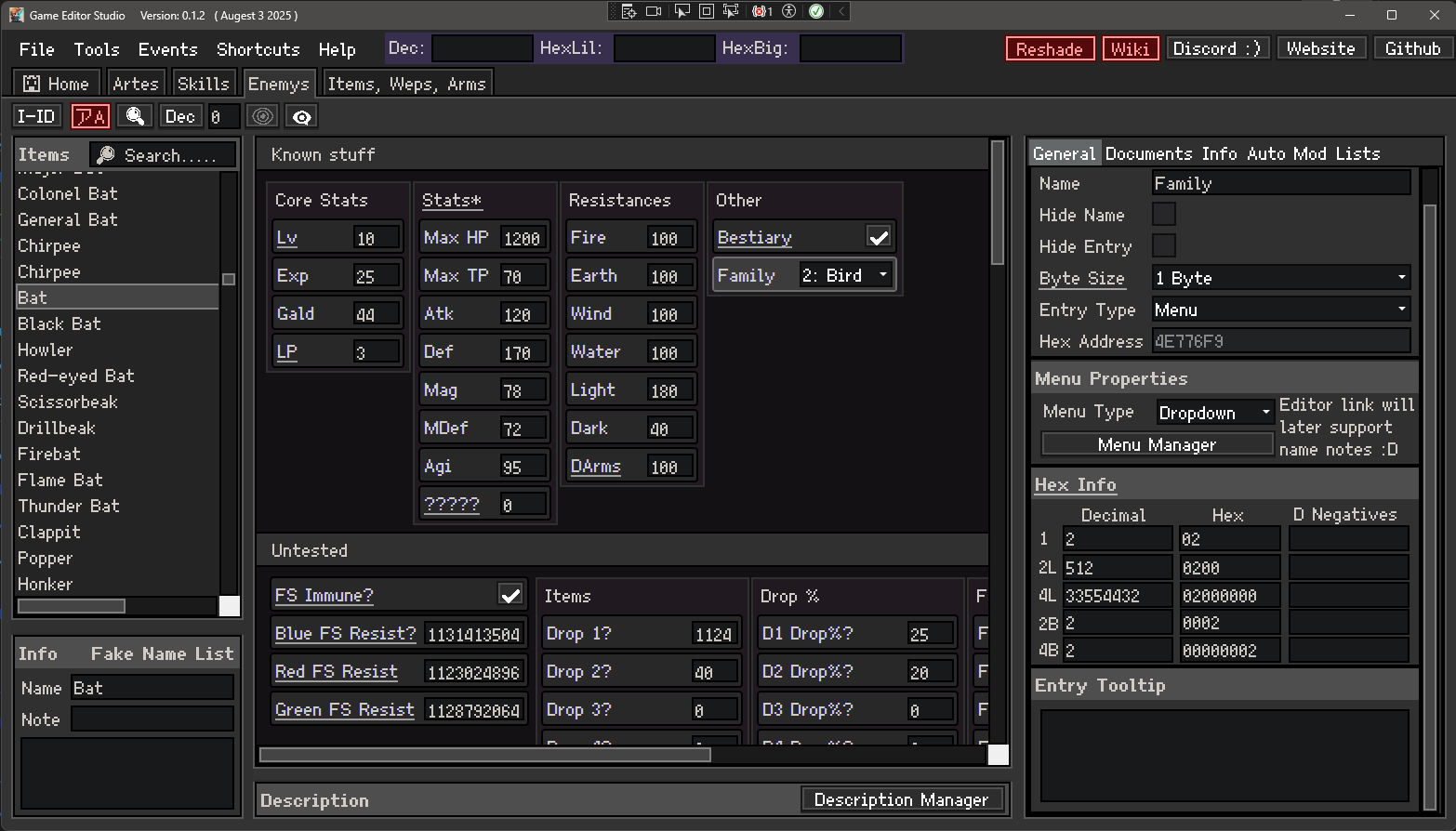
- The "Standard Editor". (Characters, Spells, Classes, Enemys, Weapons, etc).
- Creating a new one using a name table, and a data table. There are tutorials included.
- Each table byte is represented as an "Entry" (Max HP, Str, Gold, etc).
- You can freely **move entrys around** into columns, rows, and even "Groups" (basically folders).
- Entrys can be turned into checkboxes, bitflags, and dropdown menus. You can even set them to hidden.
- Dropdown menus can source text just like an editor, or pull it's name list directly from an existing editor.
- You can also give entrys a tooltip, with no size limit.
- The "Items List" of a Standard Editor.
- The List of things an editor is actually editing (Weapons, Classes, Spells, etc) are always called "Items".
- Items can be reordered, and will always save back to the games files in the origonal order!
- Items can even be sorted into folders! Just right click an item and select "Create Folder".
- You can give any item a note. Notes appear next to the item name as orange text (so they stand out).
- You can also give an item a detailed tooltip. Items with tooltips appear underlined, and stand out ontop of notes.
- Items can be renamed, and they save back to game files. **This is fantastic for making english patches!**
- More english patch features are also planned! :D
- Also, if you add a descriptions table to an editor, users can also edit item descriptions!
- Create a "Text Editor".
- A text editor lets you add any number of text files to it.
- Text editors are newer and don't have good formatting support yet, but they will in the future.
- Each text editor can hold any number of files.
- Great usage examples, one is an "AI Editor", another is a "Stage event editor".
- Basically, they are good for games that use actual text for anything.
- Tools & Events System
- GES supports 25ish third party tools (HxD Hex editor, UABEAvalonia, Floating IPS, etc)
- All tools have a download button INSIDE the program.
- You can declare that your game needs specific tools, like Nitro Packer to unpack and repack nds roms.
- You can also declare some "Common Events". Like "Unpack NDS Rom".
- Any common events enabled for a game will appear in your tools menu as quick events!
- Aside from Tools, and enabling common events, are also more advanced events.
- Made to look like the eventing system in RPG maker, you can create complex events to run.
- Events can chain "Commands" together. There exist all kinds of commands for you to use.
- A example Event is... [Save Everything] -> [Repack NDS Rom] -> [Run MelonDS with rom]
- Even a simple event can be useful. [Save Everything] -> [Run target exe] is good for PC games.
- By chaining them all together in 1 event, you create a 1 click solution to test your changes!
- In the future, many more third party tools, and many more commands will be added.
- Other misc features.
- You can export any editor into a google sheets table. Then import to google sheets and share online!
- "Auto-Mod" lets you create simple mods quickly. (All enemys give 0 exp, all items have x2 buy cost, etc)
- A Documantation system exists. Workshops can hold any number of text files for you to edit.
- Project documents exist as well. Create both public (Workshop text files) and private (project text files).
- You can preview a workshop. This gives you an idea of what it looks like without the creator needing any screenshots.
- From the Library window (before you open a workshop) you can already read the documents of the workshop.
- If a workshop has a README text file, it will be automatically selected when selecting a workshop to open.
- There is a shortcuts menu at the top of the screen to open relevant folders on your PC.
- Most parts of the program, you can right click them and they will have additional options.
- A symbology system exists. When enables, entrys tell you information about themself, useful to finding out what they do.
- for example, "I am always 0 or 1", or "I am only 1~5 and 255, so i probably represent a negative value".
PS: If this program interests you and you want to help, reach out to me on discord (Link top left).
Lets lower the complexity and burden of game modding, and simplify it enough for everyone to create mods!
This tool is made in C# / WPF / .net 9. If you think you can help or are willing to learn, Get in touch!
You can create editors, or use the editors other people have made!
(Download link is at bottom of this page)
Now for the long explanation version...
Game editor studio's main features are:
- Create a "workshop" for a game. It holds any number of editors for that game.
- The "Standard Editor". (Characters, Spells, Classes, Enemys, Weapons, etc).
- Creating a new one using a name table, and a data table. There are tutorials included.
- Each table byte is represented as an "Entry" (Max HP, Str, Gold, etc).
- You can freely **move entrys around** into columns, rows, and even "Groups" (basically folders).
- Entrys can be turned into checkboxes, bitflags, and dropdown menus. You can even set them to hidden.
- Dropdown menus can source text just like an editor, or pull it's name list directly from an existing editor.
- You can also give entrys a tooltip, with no size limit.
- The "Items List" of a Standard Editor.
- The List of things an editor is actually editing (Weapons, Classes, Spells, etc) are always called "Items".
- Items can be reordered, and will always save back to the games files in the origonal order!
- Items can even be sorted into folders! Just right click an item and select "Create Folder".
- You can give any item a note. Notes appear next to the item name as orange text (so they stand out).
- You can also give an item a detailed tooltip. Items with tooltips appear underlined, and stand out ontop of notes.
- Items can be renamed, and they save back to game files. **This is fantastic for making english patches!**
- More english patch features are also planned! :D
- Also, if you add a descriptions table to an editor, users can also edit item descriptions!
- Create a "Text Editor".
- A text editor lets you add any number of text files to it.
- Text editors are newer and don't have good formatting support yet, but they will in the future.
- Each text editor can hold any number of files.
- Great usage examples, one is an "AI Editor", another is a "Stage event editor".
- Basically, they are good for games that use actual text for anything.
- Tools & Events System
- GES supports 25ish third party tools (HxD Hex editor, UABEAvalonia, Floating IPS, etc)
- All tools have a download button INSIDE the program.
- You can declare that your game needs specific tools, like Nitro Packer to unpack and repack nds roms.
- You can also declare some "Common Events". Like "Unpack NDS Rom".
- Any common events enabled for a game will appear in your tools menu as quick events!
- Aside from Tools, and enabling common events, are also more advanced events.
- Made to look like the eventing system in RPG maker, you can create complex events to run.
- Events can chain "Commands" together. There exist all kinds of commands for you to use.
- A example Event is... [Save Everything] -> [Repack NDS Rom] -> [Run MelonDS with rom]
- Even a simple event can be useful. [Save Everything] -> [Run target exe] is good for PC games.
- By chaining them all together in 1 event, you create a 1 click solution to test your changes!
- In the future, many more third party tools, and many more commands will be added.
- Other misc features.
- You can export any editor into a google sheets table. Then import to google sheets and share online!
- "Auto-Mod" lets you create simple mods quickly. (All enemys give 0 exp, all items have x2 buy cost, etc)
- A Documantation system exists. Workshops can hold any number of text files for you to edit.
- Project documents exist as well. Create both public (Workshop text files) and private (project text files).
- You can preview a workshop. This gives you an idea of what it looks like without the creator needing any screenshots.
- From the Library window (before you open a workshop) you can already read the documents of the workshop.
- If a workshop has a README text file, it will be automatically selected when selecting a workshop to open.
- There is a shortcuts menu at the top of the screen to open relevant folders on your PC.
- Most parts of the program, you can right click them and they will have additional options.
- A symbology system exists. When enables, entrys tell you information about themself, useful to finding out what they do.
- for example, "I am always 0 or 1", or "I am only 1~5 and 255, so i probably represent a negative value".
PS: If this program interests you and you want to help, reach out to me on discord (Link top left).
Lets lower the complexity and burden of game modding, and simplify it enough for everyone to create mods!
This tool is made in C# / WPF / .net 9. If you think you can help or are willing to learn, Get in touch!
Pictures :D (If any)